zest
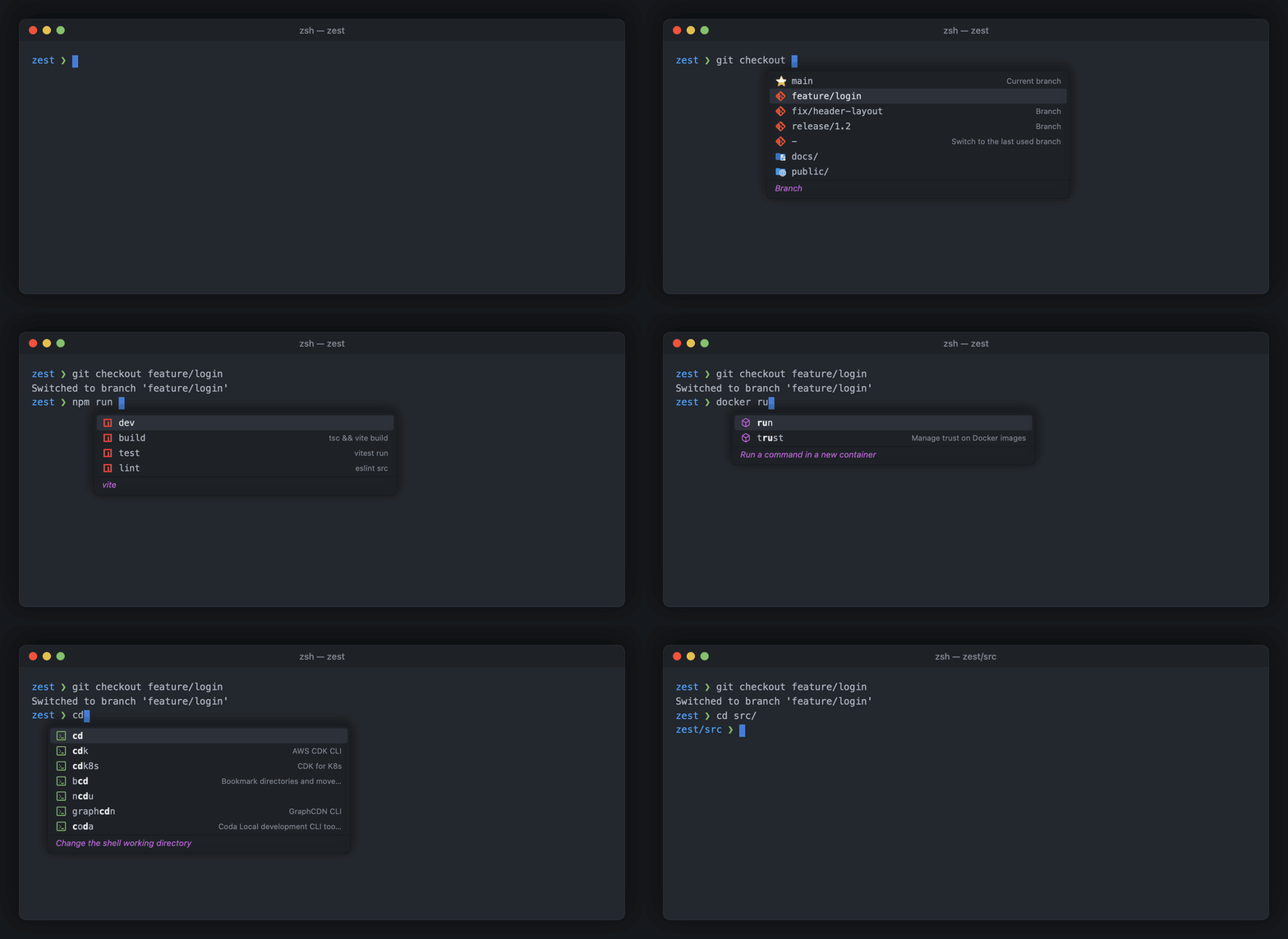
An autocomplete popup for zsh on macOS. Subcommands, options, files and git branches, with descriptions, right under your cursor in Terminal, iTerm2, Ghostty, VS Code and Cursor.
curl -fsSL https://raw.githubusercontent.com/rostik32/zest/main/install.sh | sh
Free and open source (MIT) · GitHub · Download · Homebrew
A free alternative to the Fig, Amazon Q and Kiro CLI autocomplete
zest does the one thing Fig, and later Amazon Q and Kiro CLI, did best: the completion popup. It is a small native app instead of a web view with a terminal proxy in front of every shell.
- Native and light. Written in Swift. About 20–30 MB of memory, no Electron and no web view. zsh talks to it over a local socket; nothing sits between your terminal and your shell.
- 1,500 commands out of the box. git, docker, kubectl, npm, brew, aws, gcloud and more, imported from the open-source Fig spec collection, plus files, folders and command history.
- Adding a command is one YAML file.
zest gen mytooldrafts it from--help. - Looks like your editor. One Dark Pro Darker colors, Material Icon Theme file icons and Codicons.
- Private. Everything runs on your Mac. The only network request is the update check, which you can turn off.
How to use it
| Tab | Insert the selected suggestion |
| ↑ ↓ | Choose a suggestion |
| Enter | Insert while you are typing a word; after a space it runs the command |
| Esc | Close the popup for this line |
| → | Accept the grey suggestion from your history |
Add your own command
# ~/.config/zest/specs/deploy.yaml
name: deploy
description: Deploy the app
subcommands:
  - name: staging
    description: Deploy to staging
  - name: production
    description: Deploy to production
    options:
      - name: [-f, --force]
        description: Skip the confirmation
Changes are picked up right away. See Adding a command and the spec format reference.
FAQ
Can zest replace Fig, Amazon Q or Kiro CLI?
For the autocomplete popup, yes. zest uses the same open-source command specs Fig used, so the suggestions will look familiar. It does only completion: there is no AI chat, no account and no cloud service.
Which terminals does it work in?
Terminal.app, iTerm2, Ghostty, VS Code and Cursor are tested. Other terminals work if they report the position of the text cursor through macOS Accessibility.
Does it support bash or fish, or Intel Macs?
Not yet. zest needs zsh (the default shell on macOS), macOS 14 or later and an Apple silicon Mac.
How is it different from zsh-autocomplete or zsh-autosuggestions?
Those are zsh plugins that draw inside the terminal. zest is a separate app that shows a floating popup with a description and an icon for every suggestion, from specs for 1,500 commands.
Does zest send my commands anywhere?
No. Everything runs on your Mac.